



A prepaid mobile plan offers many benefits to users.
You can switch to a different plan if you don’t like the current one without any penalties. You can get a prepaid plan without having to pass a credit check. Prepaid plans also allow you to budget better since you’ll be spending the same amount each month.
But we’re not here to talk about the advantages of prepaid mobile plans (that’s a topic for another day).
You’ll do a top-up once every 30 days so that you can enjoy uninterrupted mobile connectivity. But how do you, as a Lyca Mobile customer, top up your prepaid plan?
We’re here to give an in-depth explanation about prepaid mobile top-ups. From very basic information, like what a prepaid top-up is, to essential tips and plan recommendations, we’ve covered everything possible. Head right in!
What is a Prepaid Mobile Top Up?
A prepaid mobile top-up is a process of keeping a plan active by adding funds or credit to it. It can be done either online or offline. Most mobile operators also allow top-ups to be carried out automatically when the plan’s validity ends.
Topping up a prepaid mobile plan is essential for uninterrupted connectivity. Missing a top-up leads to blocking all benefits (call, text, and data) associated with the plan, but your number will remain active. The duration of a prepaid mobile number stays active without topping up varies from one operator to another. Some allow 30 days of inactivity, while others go up to 90, or, in some cases, up to a year.
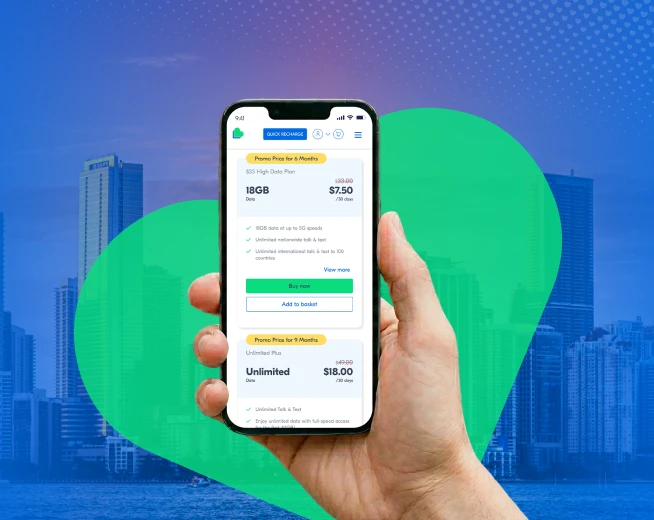
Promo Price for 6 Months
$33 High Data Plan
$ 7.50 / 30 days
18 GB Data
- 18GB data at up to 5G speeds
- Unlimited nationwide talk & text
- Unlimited international talk & text to 100 countries
Promo Price for 9 Months
Unlimited Plus
$ 18.00 / 30 days
Unlimited Data
- Unlimited Talk & Text
- Enjoy unlimited data with full-speed access for the first 40GB!
- Includes 15GB of High-Speed Hotspot Data
How to Top Up Your Lyca Mobile Plan Online
There are two ways you can top up your Lyca Mobile prepaid plan online.
The first method is using the Quick Recharge option.
Step 1: On the official Lyca Mobile website, look for the Quick Recharge option in the top right corner. Clicking on it takes you to the Recharge page.
Step 2: Enter your Lyca Mobile number.
Step 3: You can either top up your current plan or choose a different one based on your needs. The page also allows you to top up your credit.
Step 4: Pick a payment method from the available options.
Step 5: Review the order summary section and click on the Confirm & Pay button.
Step 6: Enter the relevant information to complete payment and top up your Lyca Mobile plan.
The second prepaid mobile top-up method involves logging in to your Lyca Mobile account. You can do this either through the website or by installing the official Lyca Mobile app.
Once you’ve logged in, look for the option “Top-up for you” on the dashboard. Clicking on this option directs you to the Quick Recharge page. Follow the instructions above, and you’re done!
Not just top up, you can also do a lot of cool things after you’ve logged in to your My LycaMobile account. You can
- View your current usage details
- Top up for another Lyca Mobile number
- Enable/disable Auto top up
- Modify account settings
- Add/remove payment methods
- Upgrade your current plan
- Refer a friend to Lyca Mobile
You can also top up your Lyca Mobile plan offline. Simply walk into any authorized Lyca Mobile outlet and request assistance. You can find a Lyca Mobile store near you by searching for your zip code on the Store Locator page.
Tips to Avoid Failed Payments and Top-Up Errors
This is actually more common than you think.
There are many reasons why your Lyca Mobile top-up may fail. Here are a few.
- You don’t have a stable internet connection.
- Your card has been blocked by the bank/card issuer. This happens when the bank/card issuer detects unusual spending patterns or prevents potential fraud.
- Your chosen method of payment has insufficient funds.
- The payment information you’ve entered is incorrect.
A good rule of thumb is to check the Lyca Mobile app periodically for the plan expiry date.
There’s another convenient method. You can enable Auto Renewal and forget about missed payments. Lyca Mobile’s Auto Renewal feature automatically renews/tops up your prepaid plan. It uses a saved payment method to renew your current plan when it expires, making it a great way to enjoy uninterrupted connectivity.
Best Recharge Options for International Calling and Data
Your mobile needs to change as you go through life. So, it’s only fair that you might eventually reach a point where you’re looking to upgrade your plan.
Well, Lyca Mobile has got you covered!
Lyca Mobile’s prepaid plans pack the best of everything you expect. Here are the benefits you can expect when you purchase a Lyca Mobile plan.
- Super-fast 5G data allocation
- Unlimited national calls and SMS
- Unlimited international calls and SMS to 100 countries
- Dedicated hotspot data
- Bonus roaming credit
Looking for an upgrade over a prepaid mobile top-up? Consider these plans:
- The $33 High-Data Plan at $7.50/month
- The Unlimited Plus at $18/month
- The Unlimited Pro at $29.50/month
Lyca Mobile also has some cool long-term plans. Pay everything upfront and enjoy uninterrupted access for the next 12 months.
Just picking one of these plans meets your national and international calling needs. You can also bring your existing number to Lyca. Head to the Join Lyca Mobile page to find out how.
Conclusion
That winds up our article on how to do a prepaid mobile top-up with Lyca Mobile. From renewing your current account to adding credit or extra data, the entire process can be done in less than 15 minutes.
You can renew/top-up your Lyca Mobile number either online or offline. So, if you suddenly remember recharging your Lyca Mobile number when on a grocery run, just walk into any Lyca Mobile authorized store to get the job done.
The two methods aside, we recommend enabling Auto Renewal, so you don’t have to worry about missed expiry dates.
Also, don’t forget about the official Lyca Mobile app. It brings account management to your fingertips, allowing you to purchase new lines, do a prepaid mobile recharge, seek technical assistance, and do many other things on the move.